
Download AutoAudioRecorder – audio recording, computer audio, internal audio, MP3, WAV, auto recording, webinar recording, music recording, live stream recording
Overview
AutoAudioRecorder is a focused utility designed to capture internal audio from Windows devices with minimal user intervention. Its primary function is to record sound generated by applications, system processes, and online content—such as music, webinars, podcasts, and live streams—without relying on external microphones. This makes it ideal for users who need clean, interference-free audio recordings.
The app addresses common challenges in audio capture, including background noise, inconsistent recording start/stop timing, and format limitations. It serves both casual users seeking to save online content and professionals requiring high-fidelity recordings for editing or distribution. While the developer, AutoAudioRecorder, did not provide additional background on their company or development history, the app’s feature set suggests a targeted approach to audio recording automation.
Real-world use cases include capturing lecture recordings, documenting remote team meetings, archiving music performances, and preserving live broadcasts. In the current digital productivity landscape, where remote work and online learning are prevalent, tools like AutoAudioRecorder play a crucial role in ensuring that audio content is preserved accurately and efficiently. Its emphasis on automation and format flexibility positions it as a practical solution for users who value precision and convenience.
Key Features & Functionality
- Records Internal Audio: The app captures audio directly from the system’s output stream, ensuring that only the sound played through your computer—such as music from Spotify or a Zoom meeting—is recorded. This eliminates microphone pickup of ambient noise, resulting in cleaner, more professional recordings.
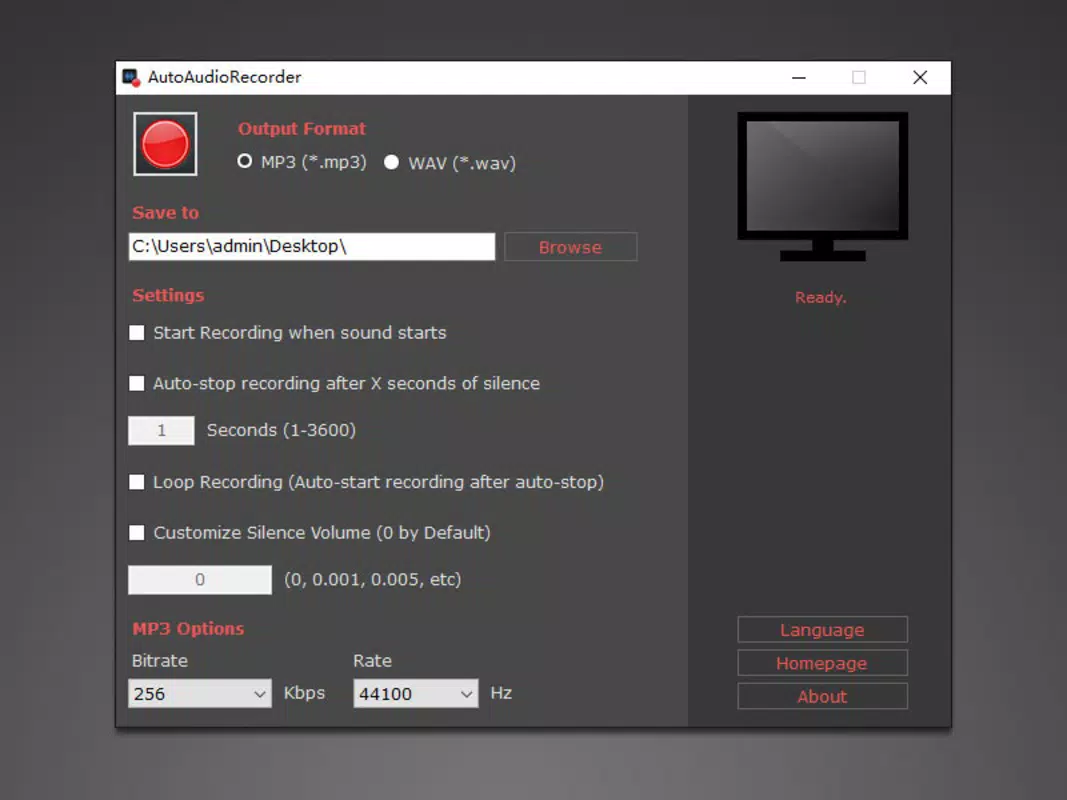
- Supports MP3 and WAV Formats: Users can save recordings in MP3 for compact, widely compatible files or in WAV for lossless, studio-quality audio. This dual-format support allows users to balance file size and audio fidelity based on their specific needs.
- Automatic Start/Stop Recording: The software begins recording when it detects audio input and stops after a configurable silence period. This feature is especially useful during webinars or long-form content where manual control is impractical.
- Automatic Resume Function: When audio stops and then resumes, the app intelligently detects the return of sound and continues recording without user input. This ensures that no segment of intermittent audio—such as a Q&A session or live commentary—is lost.
- Keyboard Shortcut Controls: Users can assign custom shortcuts, such as SHIFT+R to start and SHIFT+S to stop, enabling quick, hands-on control during active recording sessions. This enhances workflow efficiency, particularly during multitasking scenarios.
These features collectively support real-world workflows, such as recording a full-day webinar with multiple speakers, capturing a playlist from a streaming service, or archiving a live podcast with minimal oversight. The automation reduces cognitive load and increases reliability, making the app suitable for both one-time tasks and recurring content capture.
Interface, UX & Performance
AutoAudioRecorder features a streamlined interface designed around simplicity and accessibility. The main window presents essential controls—start, stop, and format selection—within a clean, uncluttered layout. Navigation is intuitive, with minimal clicks required to initiate or manage a recording session.
Visual feedback, such as a status indicator and waveform display, helps users monitor recording activity in real time. Although the developer did not list formal performance metrics, the app’s lightweight footprint of 25.4 MB suggests efficient resource usage. It is expected to operate smoothly on standard Windows systems without significant impact on CPU or memory.
Responsiveness appears consistent, with minimal lag during recording transitions, particularly when leveraging automatic start/stop and resume functions. Stability during long sessions has not been publicly documented, but the automation logic implies robust handling of audio stream interruptions. The user experience is optimized for both novice users unfamiliar with audio tools and experienced users seeking precise control.
Overall, the app balances functionality with usability, prioritizing ease of use without sacrificing core capabilities.
Platform Compatibility & Technical Requirements
AutoAudioRecorder is designed exclusively for the Windows platform. The current version is 1.1.0, with a file size of 25.4 MB, indicating a compact and lightweight installation. The developer did not specify minimum OS requirements, nor did they list compatibility with specific Windows versions such as Windows 10 or 11.
As such, users should verify system compatibility based on their environment. No additional hardware dependencies were mentioned, suggesting the app functions using standard audio drivers and system output capabilities. The absence of cloud integration or real-time sync features implies that all recordings are stored locally.
The app does not require administrative privileges for basic operation, though access to system audio may depend on user permissions. Compatibility information was not fully disclosed, so users are advised to test the app in their intended environment before relying on it for critical tasks.
Pros and Cons
Pros
- Efficiently captures internal audio without microphone interference
- Supports both MP3 and WAV formats for flexible output options
- Automated start/stop and resume functions reduce manual oversight
- Keyboard shortcuts enhance control and workflow speed
- Lightweight design with minimal system resource usage
Cons
- Platform limited to Windows; no availability on macOS or Linux
- Specific OS compatibility details were not provided
- Price point of $19.99 may be high for casual users
- No built-in editing or tagging features for recorded files
- Developer did not share update frequency or support policies
FAQ
Is AutoAudioRecorder safe to download and install?
The app is distributed through official channels, and its file size and developer name are consistent with standard software releases. As with any third-party application, users should ensure they download from trusted sources to avoid potential security risks.
Can I use AutoAudioRecorder to record online meetings?
Yes, the app is well-suited for recording webinars, Zoom calls, and other online meetings by capturing the internal audio stream directly from your computer.
Does AutoAudioRecorder work with all audio sources?
It captures audio output from applications and system processes. However, compatibility may vary depending on the audio driver and system configuration, particularly with encrypted or protected content.
How do I start and stop recording?
You can use the on-screen buttons or assign keyboard shortcuts—such as SHIFT+R to start and SHIFT+S to stop—for quick access during recording sessions.
Is AutoAudioRecorder available for macOS or Android?
Currently, the app is only available for Windows. There is no official release for macOS, iOS, or Android platforms.
Final Thoughts
AutoAudioRecorder delivers a focused, efficient solution for users who need reliable internal audio recording on Windows. Its automation features—especially automatic start/stop and resume—make it a standout tool for capturing long-form content without constant monitoring. The dual-format support and keyboard shortcut integration enhance usability across different workflows.
While the price may be a consideration for casual users, the app’s precision and reliability justify its cost for professionals and frequent users. It fills a specific niche in the productivity app ecosystem, offering a streamlined alternative to more complex audio software. If you’re looking to record music, webinars, or live streams with minimal effort and maximum clarity, AutoAudioRecorder is a strong contender.
Download AutoAudioRecorder now.


